-
How to Sharpen a Card Scraper -
Dedicated Sled Delivers Perfect Finger Joints -
Buying and Using Trim Routers -
How to Drill Windsor Chair Mortises -
How to Cut Sliding Dovetail Joints -
Router Jig for Perfectly Aligned Dadoes -
Box Making Tips and Tricks -
How to Make a Simple Jig for Offset Knife Hinges -
Best Tabletop Finish -
How to Apply an Aerosol Finish -
Five Minute Guide: Glue-Ups -
Five Minute Guide: How to Use a Tablesaw -
3 Steps to Great Glue-Ups: Sliding Dovetail Joints -
T-Track is a Smart Workbench Accessory -
Tablesaw Tapering Jig is Safer and Faster -
Upgrade Your Jointer with a Segmented Cutterhead -
Fixing Woodworking Mistakes
A Summertime Group Project
comments (0) July 18th, 2010 in blogs
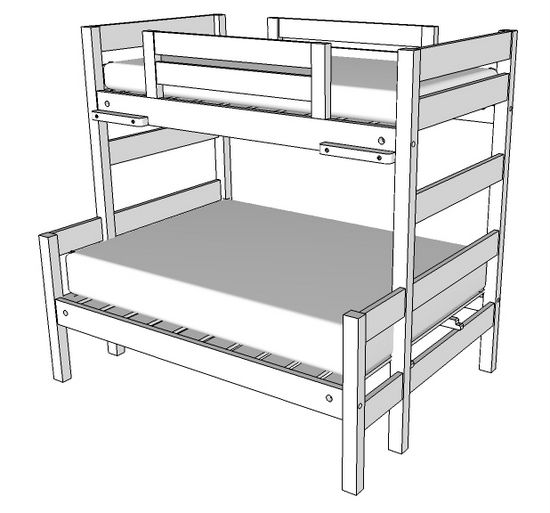
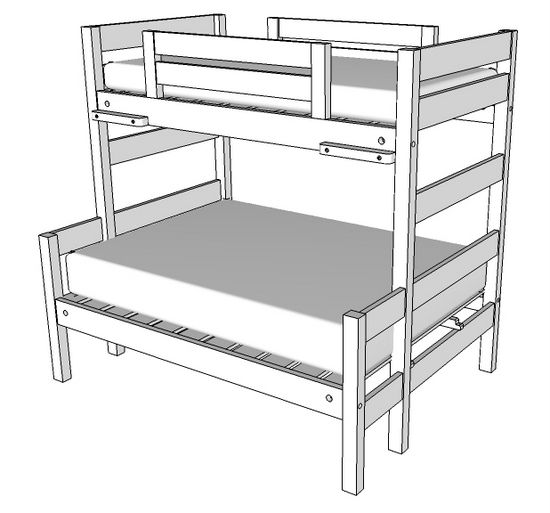
Often in summer, our local woodworking club (Diablo Woodworkers) takes on a volunteer project in the shop. This year it looks like we will be building bunk beds for the city's family camp located in the Sierra Mountains. The existing bunk beds, in metal, are worn out and falling apart. They would like to have some sturdy wooden replacements.
This is when I'm glad to have SketchUp, knowing that there will be considerable design work involving collaboration with co-workers and the city officials. For this, you need a tool that can:
• Prepare preliminary review drawings that are easy to understand and that can communicate over email
• Facilitate modifications due to review and comments
• Check dimensional requirements and safety parameters dictated by regulations
• Develop accurate detail construction drawings that can be shared across the woodworker team
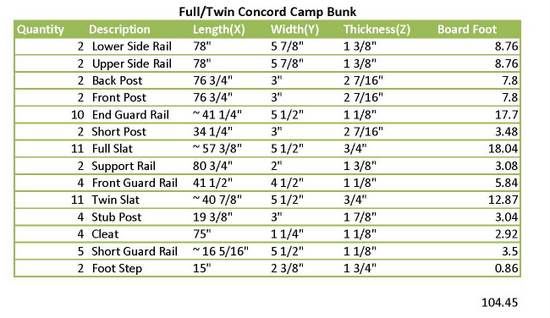
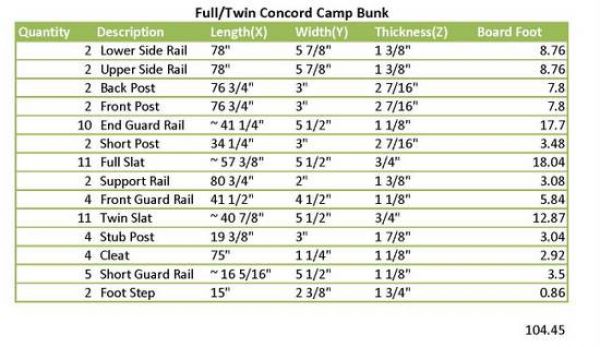
• Create a cutlist and cutting diagram for selection of lumber
SketchUp meets these requirements, and I'm in the process of finalizing the design and completing the construction package. In a couple of weeks the woodworking team will meet at the shop for a 4-day work session to complete the bunks.
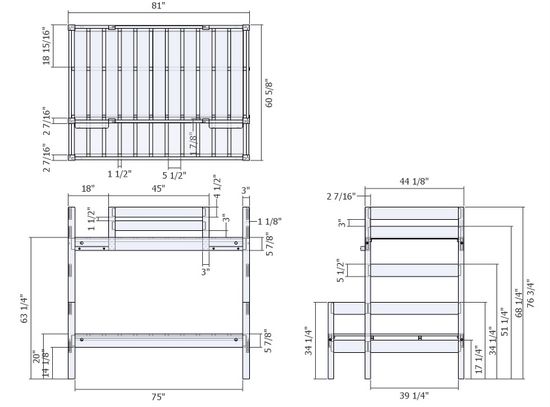
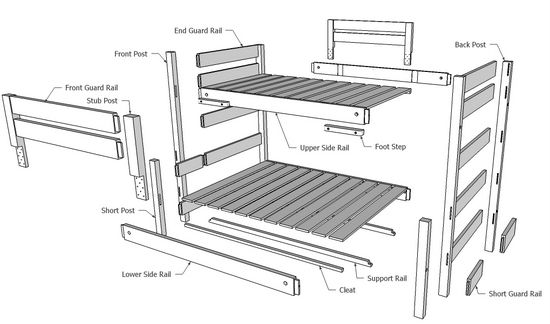
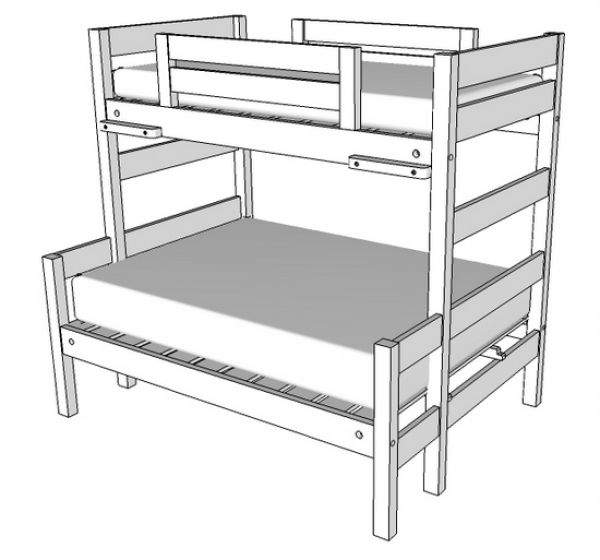
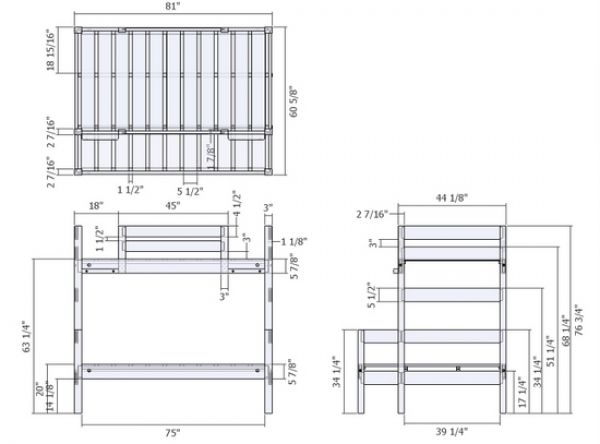
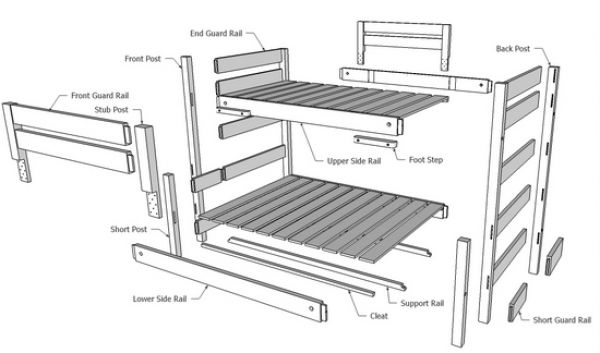
I'll show you what I included in a preliminary review package. After developing in SketchUp, I like to use Layout to assemble the package. Often I will add notes to explain design rationale or to point out some critical safety clearances or dimensions. After creating the Layout package, I export to PDF, which can be easily shipped via email and read by all reviewers.
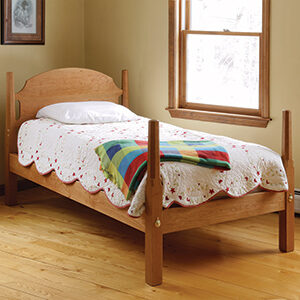
The Assembled View:
The Orthographic Front, Side, and Top View:
The Exploded View:
The Cutlist:
The shop package will include many more views including detail dimensioned views of each component.
Tim
posted in: blogs, bed
Become a Better Woodworker
About Design. Click. Build.
Learn the art and science of designing furniture in SketchUp with Fine Woodworking's official blog. Moderated by a devoted community of woodworkers, we feature step-by-step SketchUp tutorials on designing components, downloads of pre-built 3D models of furniture parts, and news and information about the evolving world of digital furniture design.
Buy the Video
Don't miss Dave Richard's brand-new DVD/video download, The Basics.
Buy the Book
Get Tim Killen's popular eBook, the Google SketchUp Guide for Woodworkers.
Basic SketchUp Tutorials
Learn the basics of building furniture in SketchUp with these classic posts from the Design. Click. Build. blog.
Creating a Project Plan in SketchUp
How I Draw in SketchUp
Axes in SketchUp
The SketchUp Move Tool
The SketchUp Rotate Tool
The SketchUp Scale Tool
Materials, Colors, and Textures
Applying Wood Grain Skins in SketchUp
Easy Dovetail Joints in SketchUp
Digital Project Plans
Download and modify SketchUp files for select projects from Fine Woodworking. View all. Top Sellers: Matt's Monster Workbench New England Pine Cupboard Garden BenchMeet the Authors
|
|
DaveRichardsI am a Biomedical Equipment Technician. I maintain anesthesia and respiratory equipment for the largest medical facility in southeast Minnesota. I...view profile |
|
|
Tim KillenI am retired from Bechtel Corporation after 36 years in Engineering and IT management. I grew up among woodworking machinery in...view profile |
|
|
FineWoodworkingEditors...view profile |


Comments (0)
You must be logged in to post comments. Log in.