
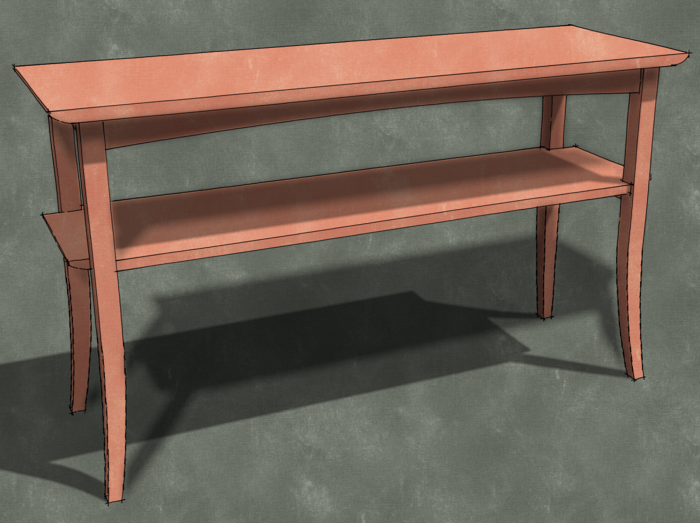
A reader asked me to describe how to make legs of the sort shown on this table. Here’s one way to do it.
This site is protected by reCAPTCHA and the Google
Privacy Policy and
Terms of Service apply.
A reader asked me to describe how to make legs of the sort shown on this table. Here’s one way to do it.
Get It All!
UNLIMITED Membership is like taking a master class in woodworking for less than $10 a month.
Start Your Free Trial
With its graceful curves, cabriole legs, and ornamental back splat, a Queen Anne side chair is a bucket list build for many woodworkers. Dan Faia had a very specific Queen…














Comments
Coincidence. I happen to be making this table right now, a copy of a Thomas Moser design. Does anyone know the dimensions of the aprons? Thanks.
I have no idea of what the real dimension is. When I drew it I made it 2-1/4" wide. Looks like it's enough to me. I don't suppose an exact width is all that critical.
Wow that was not only simple but very smart. Nicely done,
Dave:
You have contributed a lot to many woodworker's abilities to realize their dreams. Drawing clearly and cleanly is not always easy, as with the curves in this blog posting.
The Follow-Me Tool is powerful, though tricky, and your demonstration in this posting makes clear what other postings in the many other very good general web sites and blogs flash over. You ability to articulate verbally what a viewer sees on the screen is where you shine. Your cadence is excellent for those of us who do not listen at 1000 words per minute. [Many of us do not listen any faster than we talk!]
I have used SU since version 5, and, for what ever reasons, efficient and creative use of the Follow-Me Tool has been elusive. After watching this posting a few times and emulating your actions and directions, I finally got it.
Many Thanks.
Walt, thank you.
zool, thank you very much. It's nice to know that I've been able to clarify something for you.
Cheers,
Dave
dave, great work you make it all seem so easy... on a somewhat related subject, i would like to draw two arched parallel beams 3"square 2"apart with their base ends 60"apart with a height of 36" . then tilted both 15% right & lfet from each other. i'm sorry if this is not the proper form for this request.
@noman1, this is as good a place as any to ask. I'll be happy to show you how to draw it but i'm not entirely sure what it is you're asking. Do you have an illustration of something similar that you could e-mail to me? If you click on my name at the end of the blog post, you can send me an e-mail.
D
excellent tutorial. I was also having problems with follow me and making a curved leg. This really helped.
thanks.
I love your demos and the clarity of how to teach Sketchup techniques. Another excellent example to help me learn Sketchup.
Log in or create an account to post a comment.
Sign up Log in