
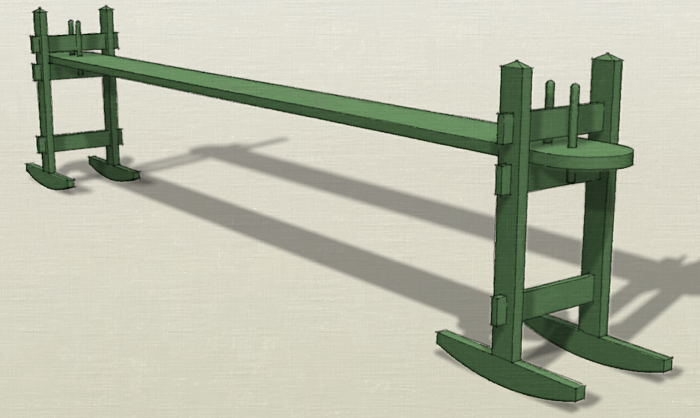
The other day I received an e-mail from a reader who is learning SketchUp. He was having some difficulty with a few details on the model of a joggling board he was trying to draw. He asked me how I would go about drawing it so I figured a video was in order. Here’s how I did it.
There are a few key things to take away from this.
Enter dimensions and distances to accurately draw things and move them around the model.
Make a component of the part you’re working on before moving on to another.
As much as possible, draw the parts where they will ‘live’ in the model.
Use existing parts as references for new parts.
Note: at about 4:35 in the video I say something about punching a mortise using the Tape Measure tool. I should have said Push/Pull. It escaped my notice until the video was completed and posted here so I’ll leave it as a blooper.















Comments
It's always amazing what one can learn from this blog. For those (like me) who never heard of a joggling board, it's a 19th century invention, the precursor of the Stairmaster and the elliptical trainer, sort of. One sits on the horizontal board and bounces gently. I guess if you were a tightly corseted and petticoated lady in 19th century Charleston, that was exercise enough. You can Google joggling board to find the web site for a company that makes these things.
thanks for the description, David. It's worth looking up on Google.
learned two things, 1 I need to learn sketchup and stop doing my drawings by hand. 2 What a joggling board is.
Does one need to have sketchup pro in order to draw the joggling board the way it was done in the video ?
Thank you,
John
Hi John,
Learned two things? It was a good day, then.
As to your question, no, you do not need the pro version to do what I did. Everything was done with very basic tools and could be done in the free version exactly the same way as in the pro version.
-Dave
Any way you'd share that drawing?
Sorry, that one isn't available.
-Dave
Log in or create an account to post a comment.
Sign up Log in