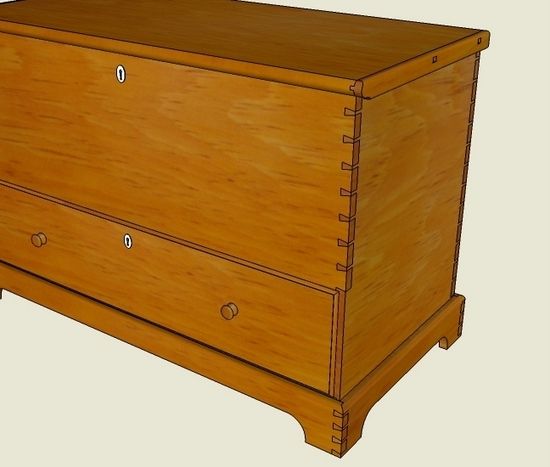
In Chapter Eight of my eBook I show a method of creating the dovetail joints in the carcase of a Shaker Blanket Chest. In my reproduction, this New Lebanon piece included 7 1/2 dovetails in the connection between the front and sides. I typically locate the two end dovetails, then equally space the remaining dovetails using a “divided line”.
On pages 39-43 I show the steps used in creating these dovetails. Below I’ve included a video showing these same steps. There is a shortcut not shown in the video – SketchUp provides a command that automatically spaces copies of things. You could place the top-most dovetail, then copy it to the location of the last half-dovetail at the bottom. Then you could type 7/ and press Enter. This command will automatically space the correct number of dovetails between the two end dovetails.
I don’t do multiple spaced copies that often in my SketchUp work. So I quickly forget the format and exact keystrokes for implementing this command. Therefore, I normally use the divided line method shown in the video. It takes a little longer, but produces good results.
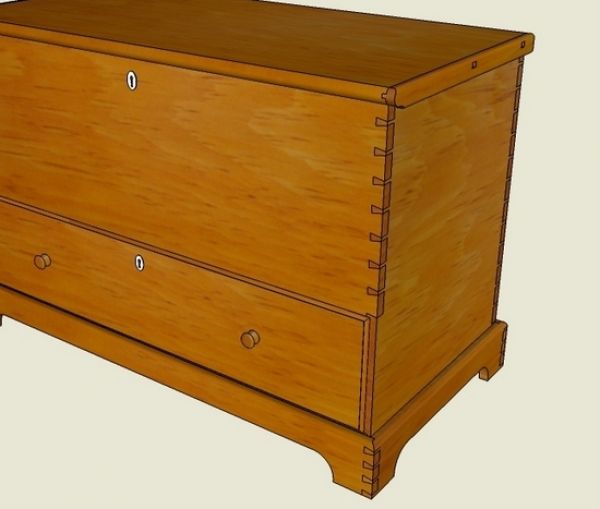
Here is a view of the SketchUp model using pine grain texture.
Tim















Comments
Which e-book are you referring to? Could you please share the links? Thanks, Gary
To UncleBrissels: The eBook is titled "Google SketchUp for Woodworkers", and is available for download right here from Taunton Press and Fine Woodworking.
Here is the link.....
http://store.finewoodworking.com/sketchup-guide-for-woodworkers-tim-killen-ebook-077846.html
Tim
Hi
Thank you Fine Woodworking for introducing me to Tim Killen and the other experts in SketchUp. I have been using SketchUp for about a year and a half.
I thought I had gotten rather proficient at it. How I new their was a lot of info missing. Now I going to pro sue my education with the help of Tim.
Thanks again
Jimmy
Log in or create an account to post a comment.
Sign up Log in