Sometimes it’s easier to determine a difficult angle by drawing a model of the problem in SketchUp and measuring the angle.
Recently in one of my classes, while hand planing the surface of a drawer front, a student asked why I was “skewing” the plane as it traveled in the direction of the grain. That is, the plane was not aligned with the plank of wood, rather held at an angle to the direction of travel.
I was not accurate, nor complete in my answer, so I checked a reference, “The Hand Plane Book” by Garrett Hack. He explains that you get good performance with reduced cutting force by skewing the plane. In further explanation, Garrett points out that “…. the effective cutting angle is lowered” when skewing the plane.
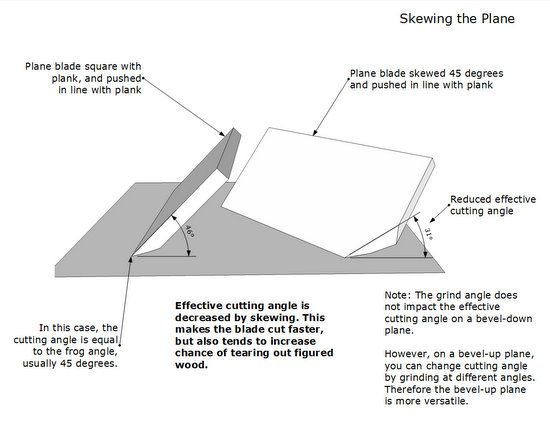
Why does the angle lower, and how much lower? were immediate questions in my mind. So I quickly created a model of the plane blade in SketchUp, to compare the straight angle with the skewed angle.
Here is my resulting illustration (in Layout) showing the angle effect of skewing:
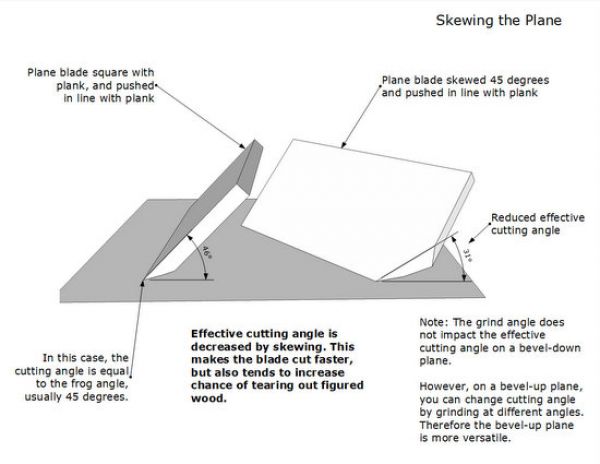
As shown, the effective cutting angle is reduced to 31 degrees when skewed at an angle of 45 degrees. This is a reduction of about 15 degrees, which is significant.
I realized that skewing may have the advantage of requiring less force, however the reduced angle can increase tear-out in difficult wood grain situations.
Tim















Comments
Tom,
Thanks for this tip. As a handplane user for 35+ years, I have always known that skewing the plane resulted in a decrease of the cutting angle, but I never took the time to figure out how much the angle actually changed. I have used Sktetchup in a similar fashion to solve shop problems involving compound angles.
With regard to the tear out issue that you raised, in my experience skewing the blade actually decreases tear out. This is counter intuitive, since the cutting angle is decreased as you noted. However, skewing the blade also changes the angle of attack of the blade relative to the grain direction, producing a shearing cut, a more grain friendly situation I believe. I have noted this result with skewed rabbet and block planes.
Thanks for again demonstrating the versatility of Sketchup as not only a tool for design, but also as a shop problem solver.
Matt
Matt, thank you for the feedback and expert information. Indeed there is a slicing action that I may have discounted in the tearout possibility. You've motivated me to do some more experimentation on a difficult grain situation.
Tim
Your article got be going back to my schoolboy trigonometry. If I have done the calculation correctly the sine of the new cutting angle is product of the sine of the cutting angle at normal incidence times the cosine of the skew angle.
Alister, thanks for the trig challenge. I'll have to try that out.
Tim
Log in or create an account to post a comment.
Sign up Log in