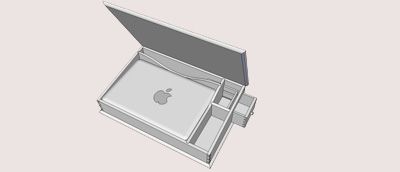
The new Christian Becksvoort lap desk project was only online for a matter of days when a SketchUp-o-phile emailed me with a new digital version of the plan customized to fit his own laptop.
The new Christian Becksvoort lap desk project was only online for a matter of days, when David Heim emailed me with a revamped SketchUp version of the desk.
David edited Tim Killen’s brand new SketchUp book and has been an avid fan of the software ever since he edited Killen’s first article for FW on the topic.
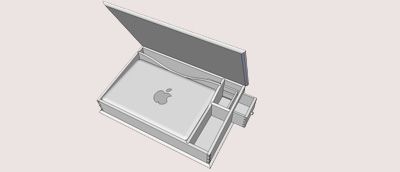
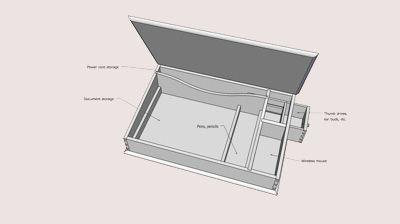
David updated the design to fit his 15-in. MacBook Pro. While he was at it, he tweaked the drawer and the partition layout.
“It may appear fussier than Becksvoort’s original, but it gives me space for documents, the power cord, pens and pencils, a mouse, even my iPod and earbuds. It doesn’t show in the sketch, but I think I’d use rare earth magnets, buried in the wood and covered with thin plugs, to hold the top closed. I wasn’t trying to out-Becksvoort Becksvoort, just trying to have some fun.”
With David’s permission, I’m sharing the SketchUp plan with all of you.
Download a copy of the SketchUp plan here.
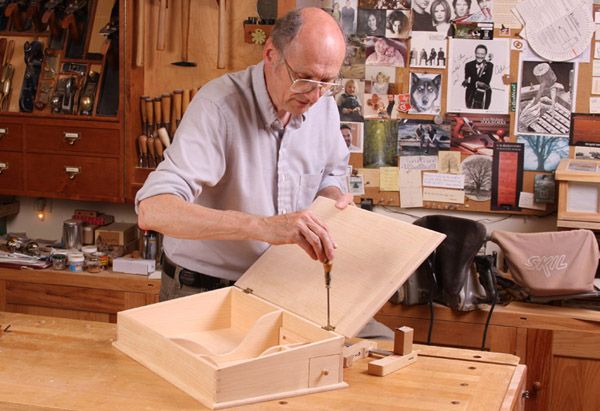
Online members can learn more about the project in this series of three online articles on the topic. They can also download a copy of Becksvoort’s original plan.
Project feedback
And… while I’m on the subject, what do you folks think of the project in general? Would you ever (or have you ever) build a lap desk?
There was some editorial back and forth about how interested people would be in this. I, for one, thought the inkwell was pretty cool. It also seems like a unique holiday gift idea.
But… on the other hand, lap desks/writing desks are a little passé… Are they making a come back, especially since they can do double duty hiding away electronic gadgets?
What do you think?
-
The new Christian Becksvoort lap desk project was only online for a matter of days when a SketchUp-o-phile emailed me with a new digital version of the plan customized to fit his own laptop.
-
Download a SketchUp version of a Shaker lap desk, customized to fit a 15-in MacBook Pro.
-
Online members can learn more about the lap desk project project in this series of three online articles. They can also download a copy of Becksvoort’s original plan.














Comments
Update: Just reuploaded the .skp plan. Dave Richards worked his magic on David Heim's original file, making a couple tweaks.
Aaaah! I wouldn't use rare earth magnets right next to your laptop. It might scramble your eggs (so to speak).
@OldMan,
Unless you're still using floppy disks or mag tapes, computers these days are pretty much immune to magnetic fields, even strong ones from rare earth magnets. I'd keep magnets away from any cooling fans (the magnet might be strong enough to cause the fan motor to stop turning temporarily), and keep them away from old-school CRT monitors, which will definitely go wacko if you bring a high-powered magnet near the screen or the yoke, possibly permanently. Hard drives use magnetic fields, but they're so well shielded that you'd have to really try hard to affect one (after all, they have rare earth magnets inside the case...).
-Steve
Out here in Idaho I am having trouble finding quarter sawn white pine. Any suggestions?
Tim
I'm pretty new to sketchup but have it installed. Sure would like to download the sketchup file for this and bring it up here on sketchup. Is it available on FWW and I missed it or how do I get it? My email address is below if that helps.
Thanks,
John
[email protected]
http://www.shojimore.com
You can download the file by clicking on the link in the middle of this text.
"With David’s permission, I’m sharing the SketchUp plan with all of you.
Download a copy of the SketchUp plan here.
Online members can learn more about the project in this series of three online articles on the topic. They can also download a copy of Becksvoort’s original plan."
Hi David, thanks for sharing the plan, it definitely is a good idea. After downloading it however I could´t open it. As a near computer illiterate it didn´t really surprise me. My system keeps asking me with which program it should be opened. Could you please help me? Thank you! Volker.
Hi David, thanks for sharing the plan, it definitely is a good idea. After downloading it however I could´t open it. As a near computer illiterate it didn´t really surprise me. My system keeps asking me with which program it should be opened. Could you please help me? Thank you! Volker.
Hi David, thanks for sharing the plan, it definitely is a good idea. After downloading it however I could´t open it. As a near computer illiterate it didn´t really surprise me. My system keeps asking me with which program it should be opened. Could you please help me? Thank you! Volker.
Hi David, thanks for sharing the plan, it definitely is a good idea. After downloading it however I could´t open it. As a near computer illiterate it didn´t really surprise me. My system keeps asking me with which program it should be opened. Could you please help me? Thank you! Volker.
Volker, you need to have Google SketchUp installed to be able to open the model. You can get it at http://sketchup.google.com/intl/en/product/gsu.html
Dave
I just completed a couple of kids lap desks from an online woodworking plan - scaled down to kid size for my niece and nephew and loaded with stuff from the Office Depot and some books recommended by Mom. They were to be all pine for weight considerations but I built the sides out of hard maple for durability and ease of joinery. Finished with Waterlux, steel wool/oil for a nice satin sheen. Can't really tell the two species of wood as all the top parts are pine. Plugged the screw holes with walnut plugs for contrast.
You can find the plans by googling children's lap desk.
Nice gift in this day and age of the computer screen.
Hello I'm trying to download the plans and the link seems to be broken?
Mr_Sully: The link is now operational. Sorry about that!
Best,
-Ed
I have 10 grandkids and this will be a great Christmas woodworking project appropriate for all ages. Crayons and coloring for the younger ones, colored pencils and art for the middle schoolers, and computer storage and worksurface for the oldest. Thanks for posting this great project.
Log in or create an account to post a comment.
Sign up Log in