
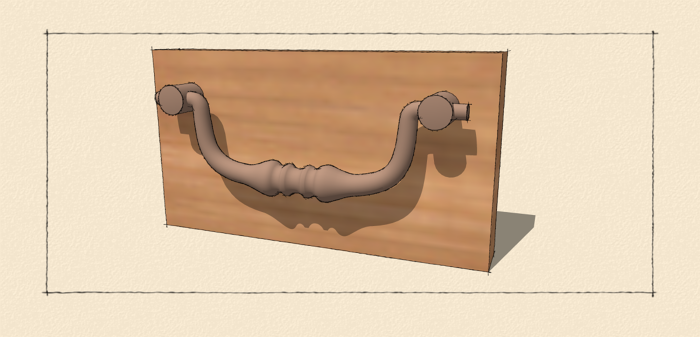
The other day a friend of mine asked me how to draw this drawer pull with the bent bail. It looks pretty difficult but thanks to a plugin called Shape Bender, it really isn’t too hard. It’s probably a little more detailed than we need for a bit of hardware on a larger cabinet but if you want it, it can be done. Take a look at this video. If you don’t need this level of detail, it might be better to draw the pull using the method I show in Creating Hardware for Your Models.
Note, if you download Shape Bender make sure you take a look at the instructions and also make sure you also install Progressbar.rb.
This site is protected by reCAPTCHA and the Google
Privacy Policy and
Terms of Service apply.

















Comments
I wish I could watch your video, Dave, but I cannot get blip to work with my browser (IE9) here or anywhere else on the web. I really hope FWW is not moving over to blip as other online content providers have done... that would effectively end my online subscription with FWW. I'm not the only person experiencing these difficulties with blip videos.
beem, I'm sorry you can't see the video. It isn't FWW that is putting videos on Blip, at least that I know of. I use Blip.tv because the image quality has been better than on YouTube.
Yours is the first report I've read of my videos not playing on IE9 so I did a little research. I've found a bit of code to add that is supposed to enable the video for IE9 users. Perhaps you could try again and let me know if it works?
--Dave
I've also upload the video to YouTube. It is available at this link: http://youtu.be/BS_LJFZL7P8
Well, I tried. YouTube wouldn't accept it due to it's length.
Thanks, Dave. I meant to say that the problems I and others have experienced are with blip videos generally not just yours. blip is not very friendly with folks who wish to browse without being tracked by advertisers. In any event, I was able to view the video only after diaabling certain addons, popup blocker, etc. I'm not a fan of blip for these reasons.
OK, maybe not. Now the video doesn't want to load. I'll try later.
Log in or create an account to post a comment.
Sign up Log in